


Muse
2.542.00 Reviews
App Specs
- Version
- 1.1.44
- Updated On
- License
- Free
- Downloads
- 10,000+
- Developer
- MUZE
- Categories
- Business
- Platform
- Android
Screenshots
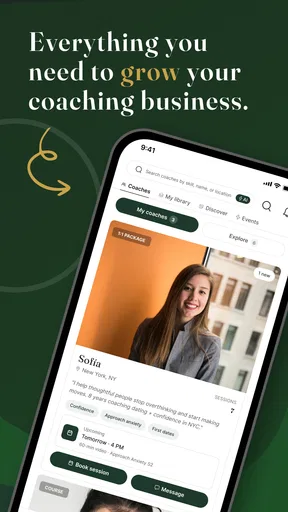
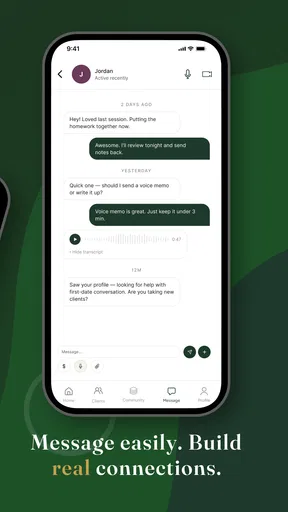
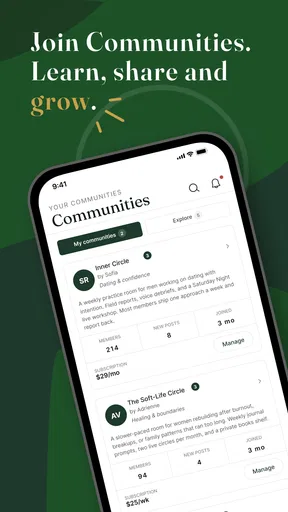
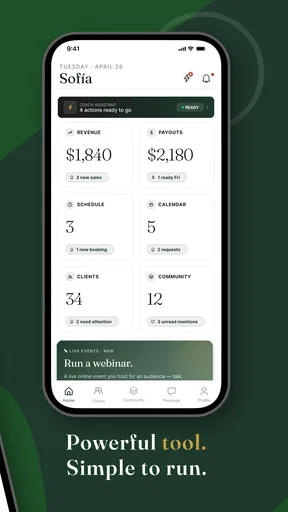
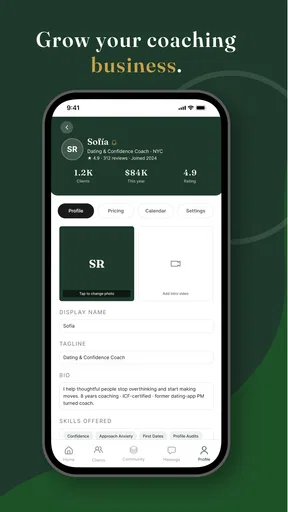
 Analysis by AppCompare
I approached Muse as a business and personal-development app rather than another generic advice feed. Its central idea is simple: bring together guidance from women who can help users think about style, confidence, work, and everyday decisions. That makes it potentially useful for someone who wants practical perspective in a more personal format than a traditional business tool.
My overall reaction is mixed but interested. The concept feels approachable, and the focus on advice from women gives the app a distinct identity. At the same time, the relatively low average rating of 2.5 from around 100 ratings suggests that the experience has not worked smoothly for everyone. I would treat it as an app worth exploring carefully, not as an essential tool that automatically replaces coaching, professional advice, or a well-organized productivity app.
How Muse feels to use in different situations
I find Muse most useful when I treat it as a brief pause for reflection, not as an answer machine. The situations that suit it best are the ones where a little perspective can help me choose a next step; the distinction matters because an everyday confidence question calls for a different kind of support than a high-stakes decision.
Readability and navigation matter more than the concept
For an advice-focused app, clear reading and easy movement between topics are especially important. I expect to open an app like this when I have limited attention: before a meeting, while planning a career step, or when I want a quick confidence boost. If the wording is easy to scan and the main areas are obvious, Muse can feel welcoming rather than demanding.
The strongest way to use it is with a specific question in mind. Instead of opening it and endlessly browsing, I would decide whether I am looking for help with presentation, confidence, personal style, or a broader life decision. That small habit makes advice apps more useful because it turns passive reading into a focused activity.
I also recommend judging the app by how quickly you can return to something useful. Advice has more value when you can remember or revisit a thought later. If navigation makes it difficult to find a useful item again, the experience becomes closer to casual scrolling than a dependable reference. This is one area where a notes app, saved articles, or a structured coaching platform may be better for long-term organization.
People with different reading preferences should pay attention to the presentation. Dense blocks of text can be tiring for users with dyslexia, attention difficulties, visual fatigue, or limited time. Short sections, strong contrast, descriptive labels, and predictable controls would make a meaningful difference. I would not assume that an attractive design is automatically an accessible one; visual polish and practical readability are separate things.
Worth Reading Before You Choose

Flipboard Shows What News Apps Must Do Beyond the Feed

Switching to Android Auto Means Rethinking Your Driving Routine

Google Calendar Makes a Crowded Week Easier to Manage

Ludo King Makes the Most of the Minutes Between Plans

Baby Panda World Brings Quick Play to Modern Phones, but Its Game Library Feels Busy

ESPN’s Live Game View Makes Following Close Games Easier
Making advice easier to process
One useful approach is to read only one subject at a time and write down a single action afterward. For example, if the app presents advice about confidence before a presentation, I might turn that into a small plan: prepare one opening sentence, choose an outfit that feels comfortable, and rehearse once. This prevents inspirational content from remaining vague.
That workflow also helps users who process information slowly or become overwhelmed by too many choices. Rather than treating every suggestion as something to adopt, I would ask three questions: does it apply to my situation, is it realistic with my resources, and can I test it safely? Muse is more helpful when used as a prompt for reflection than as an authority whose advice should be followed automatically.
Readers who prefer audio, larger text, screen magnification, or other assistive settings should test the app directly on their own device. Support can vary depending on the operating system and device configuration, and the store information does not establish a particular accessibility certification. That does not make the app unsuitable, but it does mean users should check the actual reading and navigation experience before committing to regular use.
Motor and sensory considerations
Advice apps can be easier on the body than tools that require constant typing, dragging, or precision editing, but that does not remove every barrier. Frequent small buttons, gesture-dependent navigation, unexpected movement, or crowded screens can create problems for people with tremors, limited dexterity, repetitive-strain discomfort, or reduced coordination.
My practical recommendation is to use the app in short sessions at first. Notice whether you can open a topic, move back, and select the next item without repeated taps. If a control is difficult to hit accurately, the frustration can outweigh the value of the content. Device-level features such as larger display settings, touch accommodations, or a connected keyboard may help, but they cannot compensate for every design choice.
Sensory comfort is another consideration. Users who are sensitive to bright colors, animation, visual clutter, or changing layouts should look for a calm reading experience. A business-oriented advice app should ideally make the words the focus, especially when the user is already anxious about work, appearance, or confidence. If the interface feels busy, I would use it in a quiet setting and avoid treating it as a tool for moments when concentration is already low.
There is also an emotional side to accessibility. Advice about style and confidence can motivate one person while making another feel judged or pressured. I would read recommendations as optional viewpoints, not universal rules. Someone managing body-image concerns, social anxiety, financial limitations, or workplace discrimination may need a more careful and personalized source of support than a general advice app can provide.
A realistic everyday use case
Imagine that I have a job interview the next morning and feel unsure about how to present myself. I could open Muse during a short break, look for relevant guidance, and choose one manageable change rather than trying to reinvent my appearance or personality. Perhaps the useful result is deciding on an outfit that feels familiar, preparing a concise introduction, and reminding myself to speak at a comfortable pace.
The key benefit in that situation is not a magic answer. It is the reduction of decision fatigue. A focused piece of advice can help me move from worry to preparation. However, I would still verify practical interview information elsewhere, such as the employer’s requirements, the meeting format, or professional expectations specific to the industry. Muse can support confidence, but it should not replace concrete preparation.
The same pattern could work for a user returning to work, considering a career change, or trying to feel more comfortable in professional settings. The app may be a useful starting point when the problem is uncertainty and the user wants a relatable perspective. It is less suitable when the user needs formal qualifications, legal guidance, medical support, financial planning, or a detailed step-by-step career program.
Situational access: when the app fits and when it does not
Muse is most convenient when I have a few quiet minutes and want to explore a personal question without scheduling a conversation. That makes it a reasonable companion for commuting, a lunch break, or an evening reflection session, provided the environment is comfortable and the user has enough privacy to concentrate.
It is not necessarily ideal for every context. If I am in a noisy place, dealing with poor connectivity, sharing a device, or trying to solve an urgent problem, an advice app may be too slow or too distracting. A saved checklist, a trusted friend, or a specialist service could be more effective. The best alternative depends on the question: use a calendar for commitments, a task manager for execution, a professional mentor for tailored career feedback, and a qualified adviser for high-stakes decisions.
Users should also think about cost before building a routine around the app. Muse is free to download, but it includes in-app purchases ranging from about five dollars to nearly two hundred forty dollars per item. That is a wide range, so I would avoid assuming that every useful part of the experience is included without charge. I would explore the free experience first, read each purchase screen carefully, and decide whether any paid option offers a clear benefit for my specific goal.
That pricing structure changes the comparison with ordinary alternatives. Free articles, podcasts, library resources, and community discussions may provide broader variety without the same purchase path. On the other hand, those alternatives can be scattered and impersonal. Muse’s appeal is the possibility of a more focused environment centered on women’s perspectives, but the value depends on whether the advice feels relevant enough to justify continued use.
What the current version tells me
The app is developed by MUZE and is currently at version 1.1.44. It supports devices running Android 8.0 or later, which covers many older phones but still leaves some users outside the supported range. Before recommending it to someone using an older device, I would check compatibility directly rather than assume that the app will install.
Its Everyone content rating makes the app broadly approachable from an age-classification standpoint. That should not be confused with advice being equally appropriate for every age or life situation. A teenager, a university student, a parent returning to employment, and an experienced executive may all interpret style and confidence guidance differently. I would encourage younger users to discuss major decisions with a trusted adult and treat general advice as a starting point.
The app has passed the ten-thousand-install mark, so it is not an unknown experiment with no audience at all. Still, that reach is modest compared with established business and self-improvement platforms. The combination of a small user base and an average rating of 2.5 means I would keep expectations measured and pay attention to my own experience rather than relying on popularity alone.
Remaining barriers and practical workarounds
The biggest potential barrier is not the idea; it is consistency. Advice only helps when it is easy to understand, relevant to the user’s circumstances, and simple to turn into action. If the app presents broad encouragement without enough context, users may enjoy the tone but struggle to know what to do next. I would solve that by pairing each session with one written action and one deadline.
A second barrier is personal fit. Guidance about style can unintentionally assume access to certain clothing, workplaces, budgets, cultures, or social environments. Confidence advice can also sound different depending on whether someone is shy, neurodivergent, disabled, dealing with discrimination, or simply uninterested in conventional professional presentation. I would keep the suggestions that respect my identity and discard anything that treats one way of looking or behaving as the default.
A third barrier is the difference between inspiration and expertise. A relatable voice can be valuable, but it does not automatically provide specialized knowledge. For health, legal, financial, workplace-rights, or serious mental-health questions, I would move beyond the app and consult an appropriate professional or trusted service. This is an important boundary, especially because advice about “life” can easily overlap with high-stakes decisions.
There is also a practical question about commitment. If I want a searchable knowledge base, progress tracking, detailed goal planning, or collaboration with a mentor, a conventional productivity or coaching tool may serve me better. Muse appears better suited to reflection and perspective than to managing a complex project. That is not a flaw by itself, but it is a reason to choose it for the right job.
Who I would recommend it to
I would suggest trying Muse to someone who wants approachable guidance around confidence, style, and personal growth, especially if they value women’s perspectives and prefer browsing advice independently. It may also suit users who feel stuck at the beginning of a decision and need prompts that help them name the real problem.
I would be more cautious recommending it to someone who needs guaranteed accessibility features, highly structured career coaching, offline reliability, or professional advice in a regulated area. I would also hesitate if the user is uncomfortable with broad lifestyle guidance or does not want to evaluate paid options inside a free app. In those cases, a specialist service, a plain reading resource, or a structured planning tool is likely to be a better match.
For a first session, I would choose one narrow topic, spend only a short amount of time browsing, and write down the advice that feels actionable. I would then test that advice in real life before deciding whether the app deserves a regular place in my routine. This method reveals its value quickly without requiring a large commitment.
My inclusive verdict
Muse has a clear and appealing purpose, and I like the possibility of finding personal guidance without the formality of a course or consultation. Its focus can make the experience feel more relevant than a general business app, particularly for users looking for encouragement around professional presence and confidence.
My recommendation is measured rather than enthusiastic. The low average rating deserves attention, the broad purchase range calls for caution, and the app should not be treated as a replacement for qualified help or a fully structured productivity system. Accessibility also needs to be judged through hands-on use: readability, touch accuracy, sensory comfort, and the ability to adapt the experience can differ from one person and device to another.
Muse is worth a careful trial when you want perspective and a small push toward action, but it is not the right choice when you need certainty, specialist expertise, or a deeply organized workflow. I would start with the free experience, keep my expectations realistic, and use only the advice that respects my circumstances and leads to a practical next step.
Pros
- Clean
- distraction-free interface for browsing and enjoying music.
- Useful tools make discovering and organizing content straightforward.
- Responsive performance on most modern Android and iOS devices.
- Supports personalized listening through saved preferences and favorites.
- Regular content updates help keep the experience feeling fresh.
Cons
- Some features may require an account or additional permissions.
- The free experience may include advertising or other interruptions.
- Content availability can vary depending on your country or region.
- Advanced options may be difficult to find for first-time users.
- Battery and mobile data use can increase during extended sessions.
FAQs for Muse
What is Muse, and what can I use it for?
Muse is a creative productivity and note-taking app designed to help you collect ideas, organize research, and develop projects in a visual workspace. Instead of relying only on traditional folders and lists, you can arrange notes, images, links, sketches, and other references together. It is particularly useful for brainstorming, planning, mood boards, studying, writing, and managing creative projects in one place.
Is Muse suitable for beginners, or does it require design experience?
Muse is generally approachable for beginners, although its flexible canvas may take a little time to understand if you are used to conventional note-taking apps. The interface encourages experimentation rather than forcing you into a strict structure. After a short adjustment period, most users should be able to create boards, add content, move items around, and build a personal workflow without needing graphic design or technical experience.
Can I use Muse offline, and will my work be saved automatically?
Muse may allow you to continue working on previously available content when an internet connection is unavailable, but offline access and synchronization can depend on the platform, account, and current app version. When connectivity returns, changes may synchronize automatically. Before relying on it during travel or important work, it is sensible to test offline editing and confirm that your latest changes appear correctly across your devices.
Does Muse synchronize content between devices?
Muse is intended to support a connected workflow, allowing users to access their work across compatible devices when synchronization is enabled. However, the exact experience can vary between iOS, Android, desktop, or web versions, and some features may not be identical everywhere. Check the current store listing and account requirements before downloading, especially if seamless access across multiple devices is essential to you.
Is Muse free to download, and are there paid features?
Muse’s availability, pricing, and included features may vary by platform and subscription plan. The app can often be downloaded without an initial charge, while advanced tools, additional storage, collaboration options, or expanded workspace capabilities may require payment. Review the in-app purchase details and trial conditions before subscribing, and verify whether billing renews automatically so there are no unexpected charges.


